> For the complete documentation index, see [llms.txt](https://zr-market.gitbook.io/zr-market/llms.txt). Markdown versions of documentation pages are available by appending `.md` to page URLs; this page is available as [Markdown](https://zr-market.gitbook.io/zr-market/important-to-know/disable-your-anti-virus.md).
# Disable your Anti-Virus
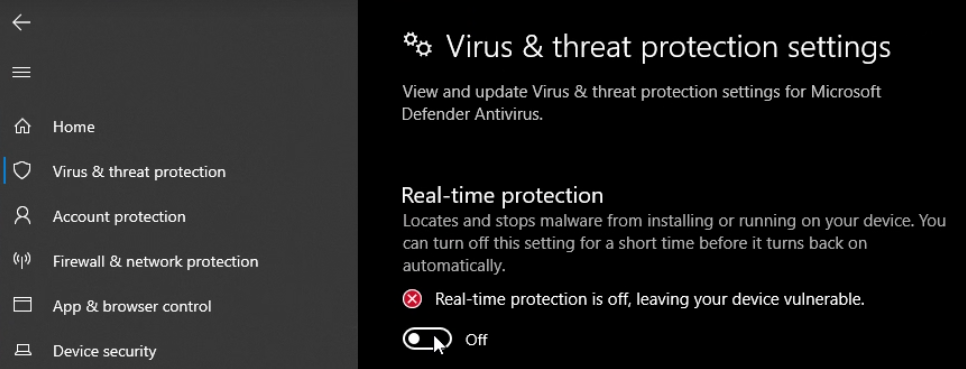
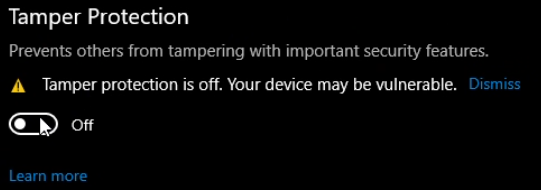
### 1 - Disable the real-time protection and the tamper protection
### 2 - Download Dcontrol : [Sordum.org](https://www.sordum.org/)[Sordum Team](https://www.sordum.org/author/velociraptor/)[Defender Control v2.1](https://www.sordum.org/9480/defender-control-v2-1/)
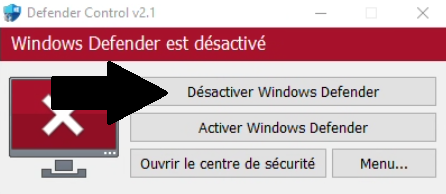
### 3 - Open the .rar folder (password : sordum) extract it on your desktop and open Dcontrol.exe
### 4 - Now click on "désactiver window defender"